Published in October 2008

Ideacodes and the IDEO Redesign

Oct 30, 2008

Ideacodes contributed to the 2008 site-wide redesign of ideo.com as interaction designers and consultants.  Bringing added perspective to the in-house team, Ideacodes collaborated with core members on navigation and functionality to create “delightful modes of interaction and content presentation.”

Creating Panoramic Photos With Your iPhone

Oct 22, 2008

One of the main reasons I use my iPhone is to take quick photos. Even though the 2 megapixel camera isn’t the highest quality, it’s the convenience and added iPhone functionality (eg. emailing) and the applications that I enjoy. One of my new favorite apps is Pano by Debacle Software (download from iTunes), which lets you take seamless panoramic photos through the iPhone’s native camera.

Pano is extremely easy to use. Launch the app, then take a photo of what you want as the panorama’s farthest left frame. You’ll take four shots total to make the panorama. Each time you take a photo, you can confirm if you want to use it or retake. After confirming the shot, the screen displays a translucent ghosted image of the previous right edge so it’s easy to match the image to take your next shot. Once you’ve taken four shots, the images are merged and the panorama placed into your phone’s photo roll.

Here are a couple of quick examples that I took. The images are sized down to 550 wide to fit here, but are originally 2686 pixels wide.

Street view at Stockton and Market, San Francisco:
pano-stockton

Night view of San Francisco:
pano-night

Abstracted view of my desk:
pano-desk

You can see more panorama examples on the Pano website, or in the new Flickr group for iPhone pano photos.

As someone that’s made panoramic photos manually or using desktop software since art school, using Pano was a pleasure and a nice reminder that at its best, technology makes our lives easier and more fun. I’ve got a new yet another hobby now.

I was also impressed by the personal customer service I received from Eric Akaoka, one of the founders. He saw my tweet while checking Twitter search and let me know that I just needed to restart my phone. I wish all customer service was this direct and helpful!

You can purchase Pano ($2.99) at the iTunes app store. It works with either the 1st gen iPhone or 3G. Two other panorama applications I haven’t tried yet are Panorama ($10), and PanoLab (free).

8 Comments

QR Codes: Mobile Tagging

Oct 17, 2008

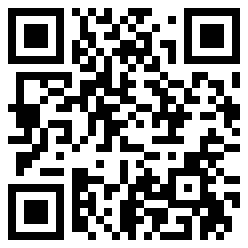
I’ve heard about QR codes for years and Googled for them long ago before they were readily available for consumers, but for some reason tonight, they popped into my mind again and I decided to look them up. I was excited to see that you can make your own QR code easily online. In simple terms, a QR code is a graphic 2D barcode that stores information, such as addresses, URLs, business card info, or anything else. Scanning the code with software on your camera-enabled mobile phone will automatically launch a browser to the specified destination. More from the Wikipedia entry below.

A QR Code is a matrix code (or two-dimensional bar code) created by Japanese corporation Denso-Wave in 1994. The “QR” is derived from “Quick Response”, as the creator intended the code to allow its contents to be decoded at high speed. QR Codes are common in Japan, where they are currently the most popular type of two dimensional codes…Although initially used for tracking parts in vehicle manufacturing, QR Codes are now used in a much broader context, including both commercial tracking applications and convenience-oriented applications aimed at mobile phone users (known as mobile tagging). QR Codes storing addresses and URLs may appear in magazines, on signs, buses, business cards or just about any object that users might need information about. Users with a camera phone equipped with the correct reader software can scan the image of the QR Code causing the phone’s browser to launch and redirect to the programmed URL. This act of linking from physical world objects is known as a hardlink or physical world hyperlinks.

These days, you can create your own QR code easily through various websites. I created my QR code with the URL information to my blog using the free service at Kaywa.
qr-code2
A quick Google search for “create qr code for iphone” lead me to this Flickr page which showed three apps for reading QR codes on the iPhone: NeoReader, barcode, and idecode (no relation to my company, Ideacodes :)

I took the poster’s suggestion and downloaded NeoReader from the iTunes app store.

Once you’ve downloaded the app, come back and try my QR code above. Simply launch NeoReader, press the “scan” button, take the picture, and you’ll be sent to http://emilychang.com.

Of course, the effect isn’t quite the same since you’re scanning the QR code on my website, but you get the idea – if this QR code were seen on the street, business card, magazine, etc., and you scanned it with your phone, you’d end up here. The hardlink between the offline, physcial world and online, virtual world is established. I’m probably going to put some up around San Francisco and see who finds them. In fact, I’m already brainstorming some mobile tagging projects. I’ve only seen maybe two QR codes on fliers in San Francisco so far. I wonder if we’ll see more adoption here in the U.S., even if we don’t catch up to Japan’s use.

UPDATE: Matt Musgrave points me to the 2dsense site, where I made the Blotcode for my site below. The graphical possibilities are endless with these!
blotcode-1
To view my Blotcode, you’ll want to download 2dsense’s free iPhone app, since they’re the only reader for the new Blotcode format.

23 Comments

Ideacodes Helps Launch Howard Rheingold’s Social Media Classroom

Oct 16, 2008

Ideacodes worked on the design and implementation of the public website for Howard Rheingold’s Social Media Classroom, which launched today.  The Social Media Classroom platform itself, developed by Sam Rose, includes a free and open-source web service that provides teachers and learners with an integrated set of social media that each course can use for its own purposes – integrated forum, blog, comment, wiki, chat, social bookmarking, RSS, microblogging, widgets, and video commenting are the first set of tools.  The Classroom also includes curricular material: syllabi, lesson plans, resource repositories, screencasts and videos.  Educators are encouraged to use the Colab and SMB materials freely, and there’s a hosted version of the Colab communities if you don’t want to install your own.

Emily Chang

This is the personal site of Emily Chang, designer and co-founder of Ideacodes, specializing in web, UI, UX, IxD. Also an entrepreneur, webling, geek, blogger, surfer. Likes robots. More...

Navigate