
I’m Goosh-ing
I came across Goosh.org yesterday through someone’s tweet and I’m in love. Goosh, a “UNIX-like command-line interface for Google,” combines the search functionality of Google with the simplicity of command line. It brings me back to the days of using Pine for email.

Goosh is written by Stefan Grothkopp and dubs itself “the unofficial Google shell.” It’s a clever browser-based interface that mimics command-line interaction with results displayed in the same style as Google (blue links, black text, green links). I appreciate this hybrid virtuality.
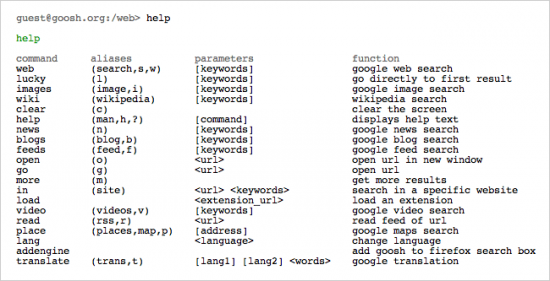
You can search any number of searches with Goosh, including web, blogsearch, wikipedia, news, feeds, video, and maps by entering a simple key command.
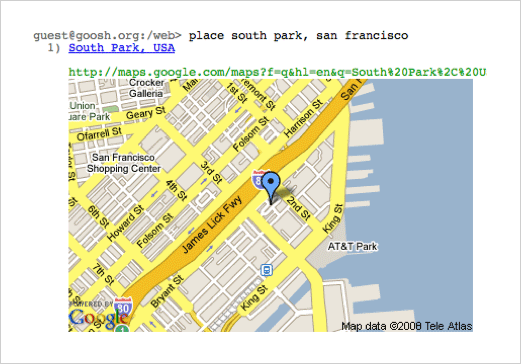
Here’s an example of searching for a location in maps. Type “place south park, san francisco”.
You can also search in localized languages. If you type the “addengine” command, this adds Goosh to your firefox search box. Type “r” and an URL and you can results from the RSS feed of that site.
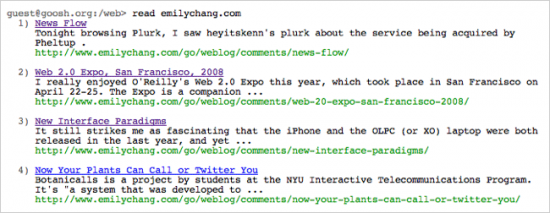
Here’s an example of reading the feed from my site. Type “r emilychang.com”.

See the screenshot below for specific commands.
Definitely try every command to see the result. You can also see a demo of the interactions at Max Kiesler’s post. Perhaps, soon, you’ll be goosh-ing too.
11 Comments
Join the discussion and tell us your opinion.
It reminds more of integrating shells and email clients into editors such as Vi and Emacs than a regular Unix shell. It would be nice if Xterms and other batch windows started to support the UI rendering of the browser so they can show multi-media content.
yep, it brings me back to the geeky age where i browse only using my keyboard :-)
cool indeed!
Related: http://yubnub.org/
Social command line for the web.
After reading your post I really had to try it out just to figure it out. Lets just say, it’s pretty addicting because it has a way of making you feel smart (except when you have to enter the command for help too much :-)
Jeff, yes, I like YubNub too. It was one of the first apps I posted to eHub back in 2005.
That. Is. Rad.
In the beginning there was the command prompt. And it was good. This is awesome.
Wow, I haven’t seen this before. Although currently I do PC Repairs, I used to be in UNIX Support. I really miss the immediacy of working on the command line. I know it takes a bit longer to get up the learning curve, but if you persevere the rewards are much much greater.
P.S> Love your site, off to play with my new toy :-)
It would be very cool if this tool was integrated with things like awk, grep, sed etc.
This looks really like a great tool Emily, thanks for letting us know.