Published in February 2008

Street Art, Union Square, SF

Feb 27, 2008

Street Art, Chinatown, SF

Feb 27, 2008

New Interface Paradigms

Feb 26, 2008

xo-iphone

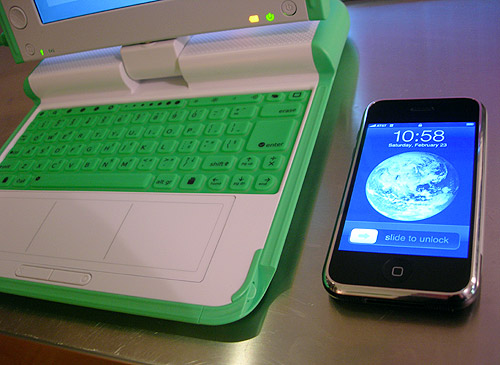
It still strikes me as fascinating that the iPhone and the OLPC (or XO) laptop were both released in the last year, and yet they’re such radically different “computing” and communication devices and concepts. I’ve spent some time playing simultaneously with the iPhone, the XO or OLPC laptop, and my regular computer combo – an Apple slim keyboard and MacPro tower. I thought about the emotional attachments I’ve formed based on user experience. Ignoring the discussion of their obviously different markets and functions for a moment, I wanted to share my experience of using each.

The iPhone has really changed my world in terms of its touch-screen gestural interface. Since it became part of my regular human-computer interactions, I often feel odd shifting back to a keyboard, mouse, and monitor scenario. On the iPhone, as you become accustomed to the gestural interface, speed and intuition are your friends. The faster I type with my index finger without thinking, the better the results. If you stop and think about where the letters are, you inevitably hit the wrong one. Let it flow from your memory of a QWERTY keyboard and you usually hit the right “keys” as if by touch. Preceding the release of the iPhone, there was a healthy amount of skepticism that the button-less screen interface would never work since all typing would have to be visual and not tactile. I definitely wondered if I would miss the tactile quality of physical buttons, but I really haven’t. As I type, there’s a visual connect with the keys as they pop up and magnify. This visual and virtual gestural response has replaced the keyboard in my experience memory. The interface itself works well, although there’s certainly room for improvement. It’s still based on a traditional mobile paradigm: activity by application – phone, email, browser, sms, and so on – and there are times where the various applications introduce exceptions to the system’s interface rules.

From an industrial design perspective, I love the feel of the iPhone in my hand. It’s smooth and glossy, just like the interface experience and visual design of the UI. It slips into my pocket easily and it’s thinness makes it feel precious. I like that the only physical button on the front of the phone is finger-sized and concave to indicate it should be pressed. I do wish the screen surface was more smudge-resistant.

I haven’t spent an equal amount of time playing with the interface of the XO laptop to have the same attachment through frequent use, although I was drawn to the industrial design of the laptop right away. Radically different in design aesthetic, the XO’s small size and large handle, bright green plastic exterior, and the graphical XO on the front are playful and cute, unlike any computer device I know. Of course, the XO is designed for children so the playfulness and miniaturized keyboard are appropriate.

The XO is designed specifically for learning and collaboration. The mesh network capabilities allow you to connect to other computers around you, or for one laptop to connect to the internet and others to get access through the one connected device. Every activity that you’re engaged in has an option to share with someone else.

From an interface perspective, the XO’s operating system, named Sugar, has the opposite appeal than the iPhone. It’s not slick and speedy, but much more simplified in each interaction, relying on point and click like most modern GUI operating systems. Despite that, it engages in equally intimate ways. The language of the interface is much more human than previous computers as is the operating system. In the journal view, the search menus default to search “Anything” and “Anytime”. Instead of a file system browser like most computers, the XO operating system uses a “journal”, which is essentially a stream of all your activities and actions on the laptop. Every application saves files to the journal as you use the computer. I find this time-based and non-hierarchical view into my activity much more compelling than the the traditional file system view. Now that I’ve seen and used this paradigm, I wish it was also part of the Apple OSX.

The interface of the XO is simplified with flat 2D graphical icons, gray tones, and colorful symbols. A “control strip” frames the screen when you hover in the corners. It’s pared down to white outlined icons on a gray background. The cursor is larger and more cartoon-like and the two touchpads respond with a toy-like click. From a hardware perspective, the XO is designed for low-battery use and the screen has a black and white mode for readability in sunlight. I also love that the laptop acts as an eBook reader, in which you can turn the entire screen around and close it to read like a flat display held in your hands.

With the XO, I was able to navigate through various functions after reading the basic instructions. With the iPhone, I didn’t read the instructions past setting up the phone and account through iTunes. Both of them pose usable, intelligent interfaces, but it’s clear that both are still in early stages of development. But there’s a sense of intimacy with each of them that can’t be ignored. Now that they’ve been introduced to my technological repertoire, I already can’t remember what it was like before they existed. I’m curious to see which aspects of each interface influence more mainstream products in the next year. I’m also fascinated to see what the kids that are now using the XO will think of other computers, or what their view of interfaces and devices will be as they get older. My first Apple certainly influenced me. What will the XO do for them?

ps – If you’re in the Bay area, there’s a meetup for OLPC / XO owners tonight in SF.

3 Comments

Now Your Plants Can Call or Twitter You

Feb 25, 2008

image

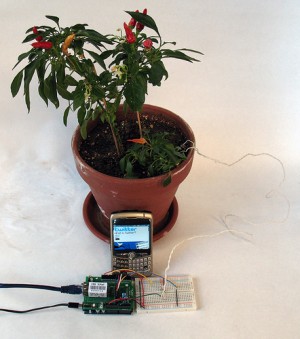
Botanicalls is a project by students at the NYU Interactive Telecommunications Program. It’s “a system that was developed to allow plants to place phone calls for human help. When a plant on the Botanicalls network needs water, it can call a person and ask for exactly what it needs. When people phone the plants, the plants orient callers to their habits and characteristics.” Botanicalls Twitter DIY is a version for Twitter so your plants can send Twitter updates when they need water, or send you their thanks.

According to the site, the system provides five different status updates, based on the plant’s current conditions:

1. When the moisture level of the plant’s soil drops below the satisfactory threshold, it will send a status update that the plant needs to be watered.
2. If the soil moisture drops below a critical level the plant will twitter that it is urgently in need of watering.
3. Any rapid rise in soil moisture will be detected as a watering event. The plant will then determine if the soil moisture has risen to the desired level for a proper watering. If it has, then it will twitter its thanks.
4. If a watering event occurs, but the soil moisture has not reached the desired level, the plant will twitter to report that it was watered, but not sufficiently.
5. Likewise, if a watering event occurs, but the plant was not in need of water yet, the plant will twitter to complain that it is being over watered.

Check the site for detailed steps on what hardware and software you’ll need to build your own. If you’ve set this up, definitely let me know in the comments. I love this! Time for a trip to Radio Shack and Ace Hardware.

12 Comments

Technology

Feb 24, 2008

Young Women Driving the Social Web

Feb 24, 2008

In an article at the NY Times last week, the writer states that “research shows that among the youngest Internet users, the primary creators of Web content (blogs, graphics, photographs, Web sites) are not misfits resembling the Lone Gunmen of “The X Files.” On the contrary, the cyberpioneers of the moment are digitally effusive teenage girls.”

She goes on to write:

Indeed, a study published in December by the Pew Internet & American Life Project found that among Web users ages 12 to 17, significantly more girls than boys blog (35 percent of girls compared with 20 percent of boys) and create or work on their own Web pages (32 percent of girls compared with 22 percent of boys).

Girls also eclipse boys when it comes to building or working on Web sites for other people and creating profiles on social networking sites (70 percent of girls 15 to 17 have one, versus 57 percent of boys 15 to 17). Video posting was the sole area in which boys outdid girls: boys are almost twice as likely as girls to post video files.

Research by the Berkman Center for Internet & Society at Harvard Law School, the result of focus groups and interviews with young people 13 to 22, suggests that girls’ online practices tend to be about their desire to express themselves, particularly their originality.

“With young women it’s much more about expressing yourself to others in the way that wearing certain clothes to school does,” said John Palfrey, the executive director of the Berkman Center. “It ties into identity expression in the real world.”

Designers, developers and entrepreneurs should take note of this and start creating more means of personal expression in online networks and social media to reflect offline identities. While girls are certainly already expressing themselves online, there are so many unexplored opportunities available for services to fill this need, rather than create a one-size-fits-all approach to providing services. It’s also time to stop assuming target audiences are male.

The article also goes on to say that this shift hasn’t taken hold in American high schools, where girls are still less than 15% of students who took the AP computer science exam in 2006, and that there’s been a 70 percent decline in incoming undergraduate women choosing to major in computer science. Personally, I don’t find much correlation between young women’s use of social media and their desire to study computer science. While I took AP computer science when I was in high school and then computer science classes in college, I’ve found little of this knowledge to be applicable to the modern social media environment. Computer science provides you with the logic and knowledge of a particular programming language, not the skills to form relationships, or pursue personal expression online, as many girls are already doing. Rather, my degrees and studies in literature, fine arts, and cultural theory have provided me with the background and the critical thinking skills and creative context to pursue a career in technology at large.

Lastly, this is a personal peeve of mine, but why are stories about girls or women in tech always silo-ed in the “Fashion and Style” section of the NY Times? If we’re going to dispel stereotypes, wouldn’t it be logical to publish these articles in the “Technology” section where they belong?

7 Comments

Red Sky

Feb 20, 2008

Clear Qee and Totoro

Feb 20, 2008

Video Bits

Feb 17, 2008

It’s the weekend and I’m going through my digital archives and files again. I know, it’s an obsession. While I definitely output a lot to the web and the social sites I use, there’s always an exponentially increasing amount of digital data that I’m collecting on my computer and storage devices. The more I collect on my hard drives, the less fluid I’m feeling. So, I plan to start a process I’ve done before – transferring everything I create or collect from my many hard drives to my site, including notes, designs, references, observations, art, writing, photographs, videos and screenshots… a living archive of personal ephemera.

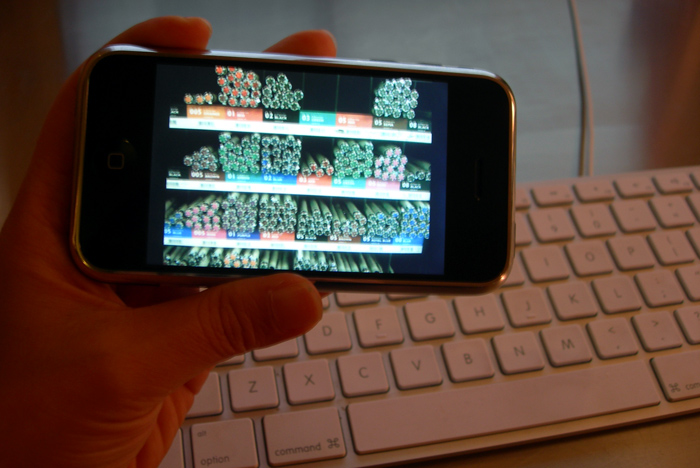
videobits

First off is this small collection of videos shot on my low-res Nikon Coolpix 7900 digital camera at various points. I’ll keep adding to it as an ongoing video diary. I’ve had ideas and plans to do other types of videos with my recently purchased JVC Everio HD camera. I’m still pondering over specific ideas and looking for a chunk of free time but I thought it would be self-motivating if I added a section for videos. If you’d like to get video updates, just subscribe to my main blog RSS feed.

To create web videos, I’m converting my source .mov files to .flv using ffmpegX, a Mac OS X program that runs 20 powerful Unix open-source video and audio processing tools. It’s super fast and easy to use. To display the FLV videos with the flash controller, I’m using Jeroen Wijering’s FLV media player which acts as a single-install and single-file player “skin” for all your videos. The FLV media player is licensed under Creative Commons so you can use it for free and upload it to your own server. I highly recommend both tools for hosting and displaying your own FLV videos.

In the spirit of the social web, I might still upload these to a service like viddler, vimeo, blip.tv. Or not. These days I’m feeling that sometimes there are some digital files you want to keep close to home – like these, captured for personal memories.

Emily Chang

This is the personal site of Emily Chang, designer and co-founder of Ideacodes, specializing in web, UI, UX, IxD. Also an entrepreneur, webling, geek, blogger, surfer. Likes robots. More...

Navigate